


How does the grace period for Salmon Product Loan work?
Some Salmon Product Loan offers include a grace period. If your offer includes one, you can repay your full loan amount with 0% interest and no monthly service fee.
To keep the benefit, pay each monthly amount due on time and pay the full loan amount before the grace period end date. You must also pay any applicable Extra Care Package charges.
What is a grace period?
A grace period is a benefit included in some Product Loan offers. It gives you time to repay your full loan amount without interest or monthly service fees.
Not every Product Loan includes this benefit. The grace period must be part of your offer when your loan is approved. It cannot be added later.
The grace period for a Product Loan works differently from the grace period for Salmon Credit Line.
What do I need to do to keep the 0% benefit?
To keep the grace period benefit:
- Pay each monthly amount due by its due date
- Do not let your loan become overdue, even by one day
- Pay the full loan amount before the grace period end date
- Pay any Extra Care Package charges included in your loan agreement
If your loan becomes overdue, the grace period benefit ends and cannot be restored.
Where can I check the amount to pay and the deadline?
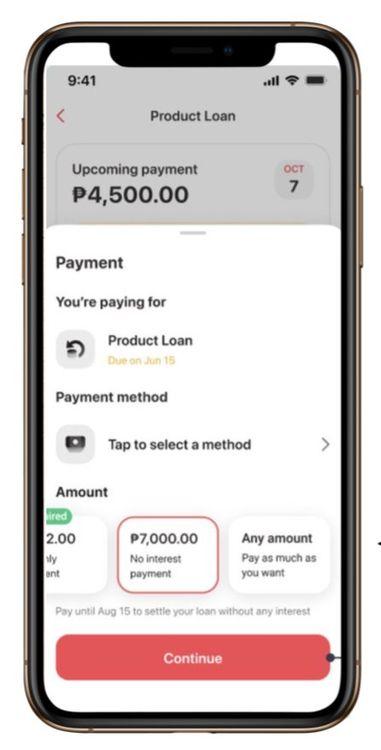
Always check the latest amount in the Salmon app before making a payment to ensure you pay the correct balance.
Open the Salmon app.
Select your Product Loan.
Tap Go to payment.
Check the amount shown under No interest payment.
Choose a payment method and complete your payment before the grace period end date.
You can also find your full loan amount and grace period end date in your loan agreement.
Example of a loan agreement
This example shows a Product Loan with a 12-month term from 1 Apr 2026 — 1 Apr 2027 and a six-month grace period.
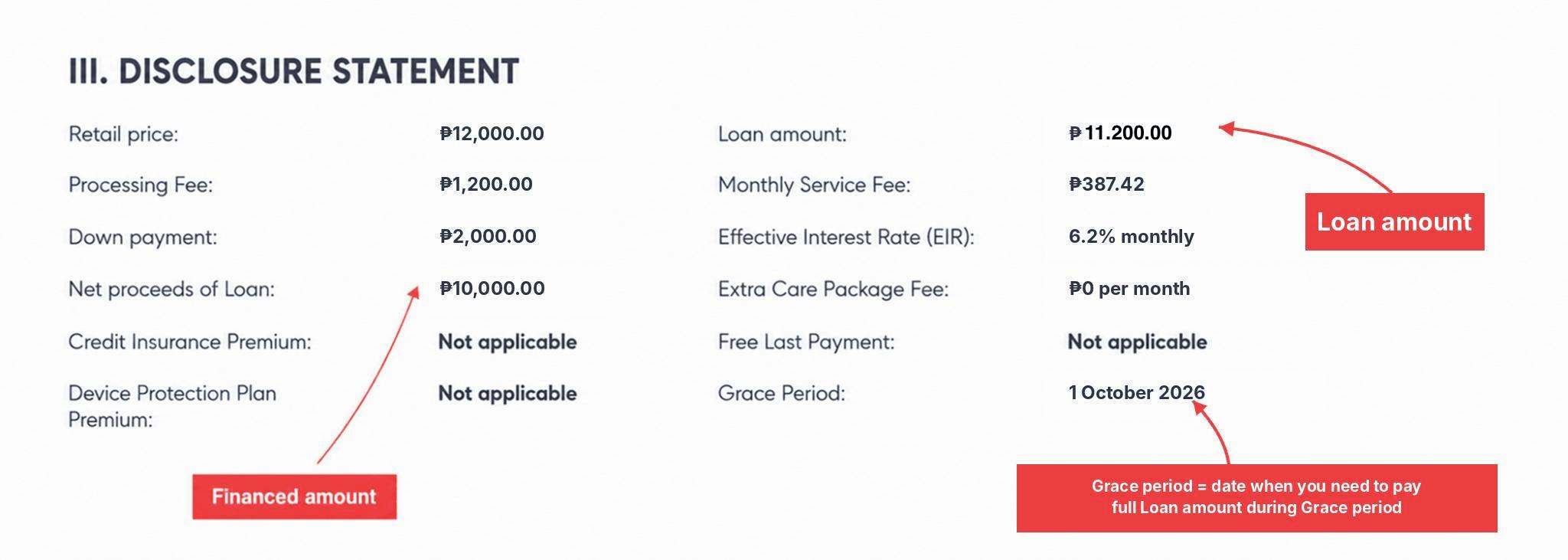
To keep the grace period benefit, pay:
- The full loan amount, including the financed amount and processing fee
- Any applicable Extra Care Package charges
- The required amounts before the grace period end date
How much do I need to pay?
To keep the grace period benefit, pay the full loan amount before the grace period end date.
The full loan amount may be different from your monthly amount due. It includes the financed amount and processing fee shown in your loan agreement. Extra Care Package charges are paid separately.
Example
Suppose your Product Loan has the following amounts:
| Item | Amount |
|---|---|
| Financed amount | ₱10,000 |
| Processing fee | ₱10,000 × 12% = ₱1,200 |
| Full loan amount | ₱11,200 |
If your monthly amount due is ₱1,550 and you make six monthly payments:
| Monthly amount due | Number of payments | Total paid |
| ₱1,550 | 6 | ₱9,300 |
You would still need to pay ₱1,900 before the grace period end date to complete the full loan amount of ₱11,200.
The amounts and rates in this example are for illustration only. Your actual financed amount, processing fee, monthly amount due, grace period length, and other terms may be different. Check the Salmon app and your loan agreement for your actual details.
How does the Extra Care Package affect the amount?
Extra Care Package (ECP) charges are separate from your full loan amount. They do not reduce the amount needed to repay your Product Loan.
If ECP is included in your loan agreement, it is charged for each full month your loan remains active. The month when you fully repay the loan is not counted as a full month.
For example, suppose your full loan amount is ₱11,200 and your ECP charge is ₱49 a month:
| Payoff month | Full months completed | ECP charges | Full loan amount | Total to pay |
| Month 1 | 0 | ₱0 | ₱11,200 | ₱11,200 |
| Month 2 | 1 | ₱49 | ₱11,200 | ₱11,249 |
| Month 6 | 5 | ₱245 | ₱11,200 | ₱11,445 |
Your ECP amount may be different. Check your loan agreement for the charge included in your Product Loan.
ECP does not extend your grace period or change its end date.
How can I repay within the grace period?
You can repay the full loan amount in different ways. These examples use a full loan amount of ₱11,200 and do not include ECP charges.
Split the amount into regular payments
Pay ₱1,867 for the first five months and ₱1,865 in the sixth month.
Total paid: ₱11,200
Pay the monthly amount due, then pay the remaining amount
Pay ₱1,550 for the first five months. Pay the remaining ₱3,450 before the grace period end date.
Total paid: ₱11,200
Pay the remaining amount earlier
Pay ₱1,550 in the first month, ₱1,550 in the second month, and the remaining ₱8,100 in the third month.
Total paid: ₱11,200
You can also make one full payment at any time before the grace period end date. Keep every monthly payment up to date until you fully repay the loan.
What happens if I miss a payment?
If your Product Loan becomes overdue, even by one day:
- The grace period benefit ends and cannot be restored
- Your loan continues under its regular terms
- Interest, monthly service fees, and other applicable charges may apply
- Your updated amount and payment schedule will appear in the Salmon app
Check your loan agreement for the regular terms that apply to your Product Loan.
What happens if I lose the grace period benefit?
If you do not meet the grace period requirements, your loan continues under its regular terms.
You may need to pay interest, monthly service fees, and other applicable charges based on your loan agreement. Check the Salmon app for your updated amount and payment schedule.
Important reminders
- The grace period is available only on eligible Product Loan offers.
- Its length depends on your specific offer.
- Pay every monthly amount due on time.
- Pay the full loan amount before the grace period end date.
- Pay any applicable ECP charges separately.
- ECP charges do not reduce your full loan amount.
- ECP does not extend the grace period or change its end date.
- Check the Salmon app for the latest amount before paying.
Review your loan agreement or ask Salmon Customer Service via in-app chat to check if your Product Loan offer includes a grace period.
The grace period benefit is available only for eligible Product Loan offers. The exact conditions, including grace period duration, loan terms, and processing fee, depend on the specific store where you apply.
Check your loan agreement or ask the Salmon partner store staff before you apply to confirm whether your Product Loan has a grace period.
Please take note: The grace period benefit applies only if you pay the full grace period amount before the grace period end date and make all scheduled monthly payments on time. Exact fees, interest rates, and terms are specified in your loan agreement. LoanOnline, powered by the Salmon app, serves as the online lending platform for Sunprime Finance, Inc. (SEC Reg. No. CS201916698, C.A. No. 1241). Salmon Bank (Rural Bank) Inc. is regulated by the Bangko Sentral ng Pilipinas.
You must pay for the Extra Care Package (ECP) separately. These payments do not reduce the amount you need to fully repay your Product Loan.
The Extra Care Package (ECP) does not extend your grace period or change your grace period end date.